

Add a Memory Layer to Your Presentations with Cognee and SlideSpeak
Written by

Published on
On this page
SlideSpeak is great at turning a few documents into a polished presentation in minutes. But it only knows what you hand it for that one deck. Every new presentation starts from a blank slate, and nothing carries over to the next one.
Cognee fixes that gap. It’s an open-source memory platform for AI agents. Instead of feeding SlideSpeak the same documents over and over, you build a running memory once. Cognee captures your documents and data and turns them into a graph-based knowledge base. Then it recalls the right context on demand. Pair the two and every deck draws on a persistent, ever-growing knowledge base instead of a one-off prompt.
Below, we’ll cover what Cognee is, how it works, and how to set it up with SlideSpeak.
What is Cognee?
Cognee is an open-source memory platform for AI agents. It solves a basic problem with large language models, which forget everything once a context window ends. Cognee gives them a durable memory layer that the same agent can read and write across sessions, and that gets richer the more you add to it.
What makes it different is how it stores your data. Instead of leaning on embeddings alone, where a search returns the nearest chunks of text, Cognee builds a knowledge graph. It extracts the entities, relationships, and domain rules hidden inside your content, so an AI can search by meaning and reason over how things connect. Every answer also carries its provenance, so you can trace it back to the source document. And because it’s open source and can run locally, you stay in control of your data.
Setting Up Cognee
The easiest way to get started is Cognee Cloud, the hosted version that runs all the infrastructure for you. You sign up at platform.cognee.ai, then upload your data, explore the knowledge graph, and run searches right from the browser, with no setup to manage.
Cognee is also open source, so you can run it locally if you’d rather keep everything on your own machine. The quickstart covers setting up the Python package, and the Cognee UI guide shows how to run the same dashboard locally. The rest of this walkthrough uses Cognee Cloud, but the steps are the same either way.
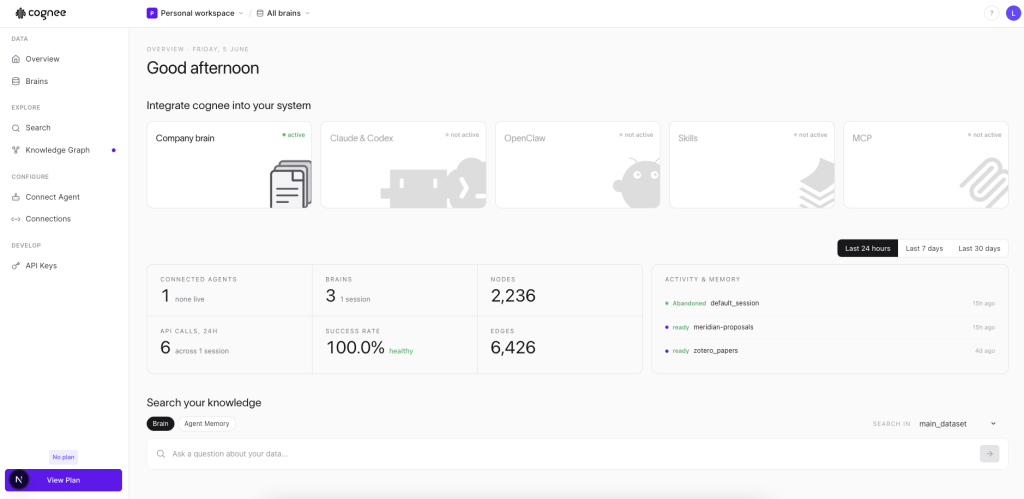
At a high level, the workflow comes down to three steps.
1. Add your knowledge
Upload the source material you want your presentations to draw from. You can also pull in data from external systems like databases and APIs through Cognee’s integrations, so something like a CRM export can feed the same memory.
For this walkthrough we add a batch of our past project proposals, but this could just as easily be product docs, research notes, or transcripts.
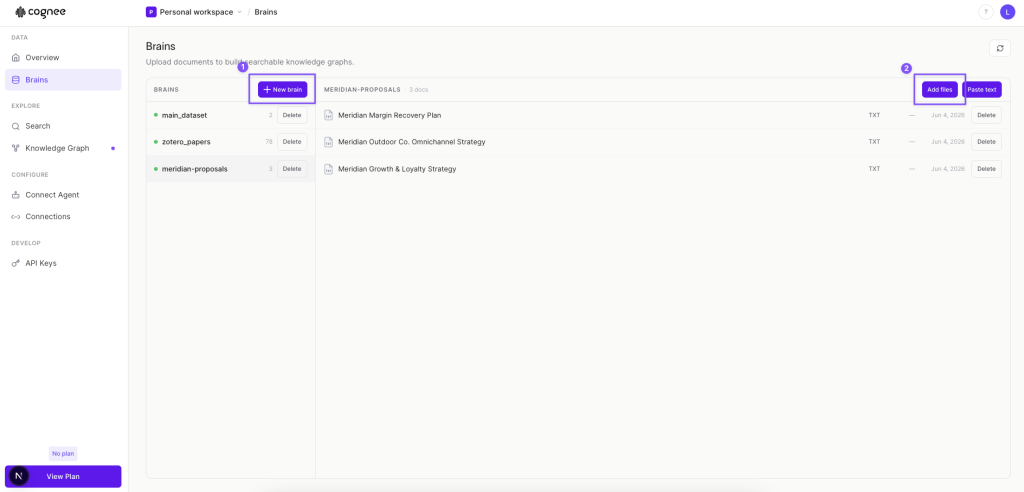
In the dashboard, Cognee groups your knowledge into Brains, each one a separate searchable knowledge base. Head to the Brains page, click New brain to create one for your proposals, then use Add files to upload documents or Paste text to drop in content directly. Once the files are in, they’re listed under the brain and ready to be processed.
2. Build the memory
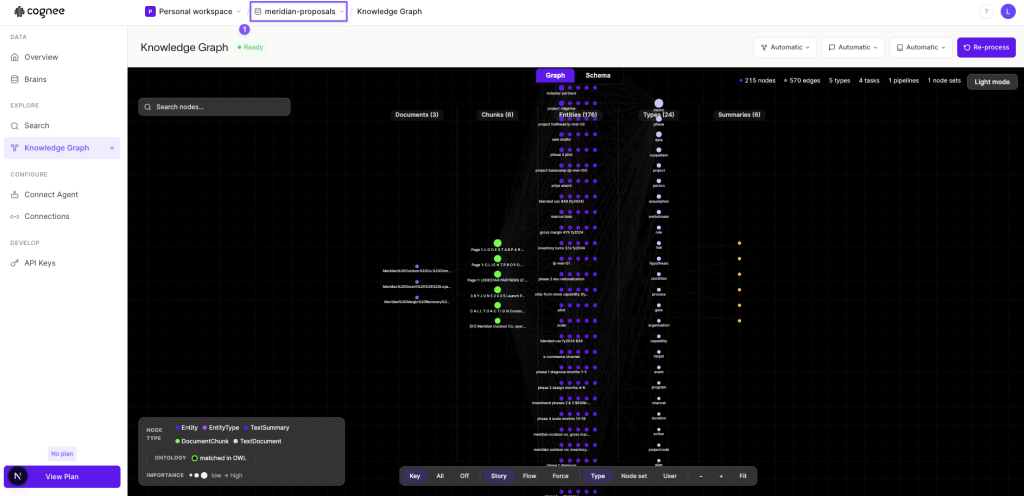
Cognee ingests the proposals and turns them into a knowledge graph of entities and relationships, so the clients, deliverables, and themes across them are all connected.
You can open the Knowledge Graph tab in the dashboard to see this for yourself, with the documents, entities, and types laid out as a network you can search and explore.
3. Recall what you need
When you’re ready to build a deck, query Cognee in plain language, for example asking how past proposals were structured for similar clients, and it returns the most relevant, connected context from across them, with each answer traced back to the proposal it came from so you can verify it.
Once that context is in hand, you’re ready to bring it into SlideSpeak.
Generating the Presentation with SlideSpeak
The dashboard is great for exploring your memory by hand, but the real payoff is wiring the two tools together so a finished deck comes out the other end. The SlideSpeak API lets you do exactly that. You query Cognee for the context you need, then post that context to SlideSpeak and get back a PowerPoint. All you need is a SLIDESPEAK_API_KEY from your SlideSpeak account.
The examples below are written in Python, using Cognee’s Python package and the SlideSpeak API.
Build the brief in Cognee
Rather than asking one broad question, it works better to query the brain section by section, with one question per slide you want. Each answer becomes part of a structured brief. Here we define the sections, then loop over them and search the dataset for each.
import cognee

DATASET = "meridian-proposals"

# Each tuple is one slide: its heading and the question we ask Cognee for it
SECTIONS = [
    ("Client Context & Background",
     "Who is the client and what context frames a proposal about {topic}?"),
    ("The Opportunity",
     "What core problem or opportunity should a proposal on {topic} address?"),
    ("Our Recommended Approach",
     "What approach and workstreams would past proposals recommend for {topic}?"),
    ("Plan & Phasing",
     "What phased plan or timeline would a proposal on {topic} lay out?"),
    ("Expected Impact",
     "What KPIs and business value should a proposal on {topic} promise?"),
]

async def gather_brief(topic):
    parts = [f"Proposal: {topic}", ""]
    for heading, question in SECTIONS:
        results = await cognee.recall(
            query_text=question.format(topic=topic),
            datasets=[DATASET],
        )
        text = "\n".join(str(r) for r in results).strip()
        if text:
            parts += [f"## {heading}", text, ""]
    return "\n".join(parts).strip()
Since each query is scoped to your dataset, the brief stays grounded in your own proposals instead of made-up details.
Hand the brief to SlideSpeak
Now send that brief to SlideSpeak’s generate endpoint. The API is asynchronous, so you submit the job, poll until it finishes, then download the file.
import requests, time

SLIDESPEAK_API = "https://api.slidespeak.co/api/v1"
HEADERS = {"X-API-Key": SLIDESPEAK_API_KEY}

def generate_deck(brief, slides=12):
    # Start generation and get back a task id to track
    task_id = requests.post(f"{SLIDESPEAK_API}/presentation/generate", headers=HEADERS, json={
        "plain_text": brief,
        "length": slides,
        "template": "DANIEL",
        "tone": "professional",
        "custom_user_instructions": "Client-facing proposal. Keep every claim grounded in the provided text.",
    }).json()["task_id"]

    # Poll until it's done, then return the download link
    while True:
        status = requests.get(f"{SLIDESPEAK_API}/task_status/{task_id}", headers=HEADERS).json()
        if status["task_status"] == "SUCCESS":
            request_id = status["task_result"]["request_id"]
            return requests.get(f"{SLIDESPEAK_API}/presentation/download/{request_id}", headers=HEADERS).json()["url"]
        time.sleep(3)
Putting it all together
With both helpers in place, generating a deck for any topic is two calls. Here we generate a new proposal deck for “Loyalty Program Expansion 2026”, pulling the relevant context from our past proposals and handing it to SlideSpeak.
import asyncio

async def main(topic):
    brief = await gather_brief(topic)
    url = generate_deck(brief)
    print(f"Deck ready: {url}")

asyncio.run(main("Loyalty Program Expansion 2026"))
That’s the whole loop. Change the topic and you get a fresh deck, every one built on your own knowledge base instead of a blank prompt.
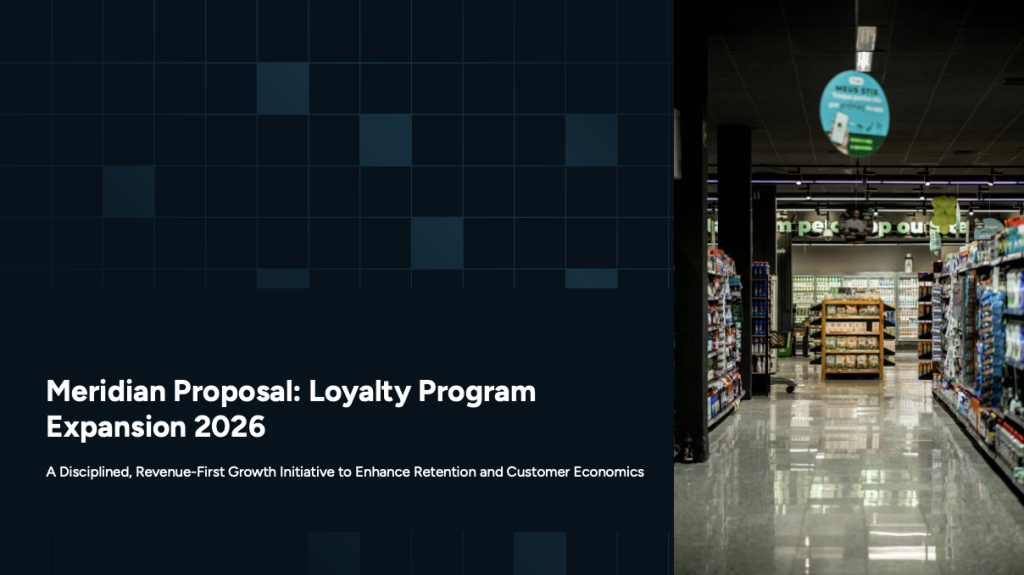
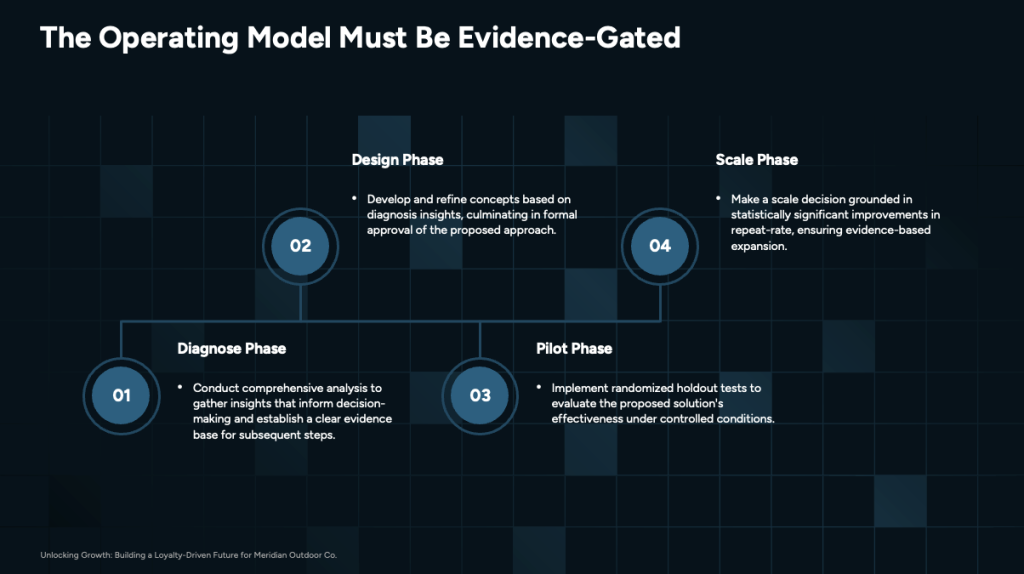
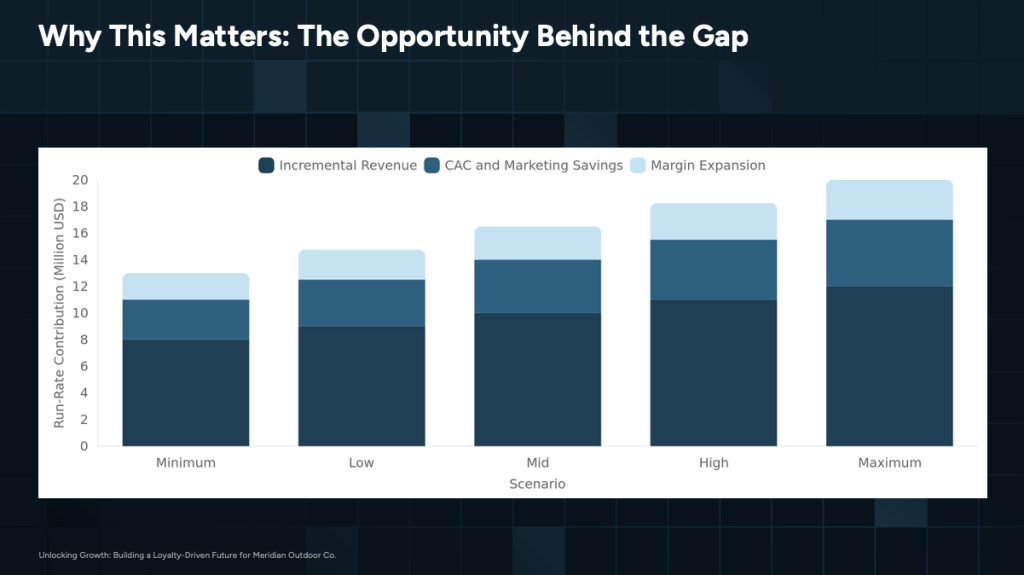
Here’s a glance of what SlideSpeak produced for our “Loyalty Program Expansion 2026” proposal, with the content drawn straight from the past proposals in Cognee.

Conclusion
On its own, an AI presentation tool can only work with what you give it in the moment. Pairing it with a memory layer changes that. Your knowledge stays in one place, grows over time, and is ready whenever you need to build something new.
Cognee gives you that persistent, graph-based memory, and SlideSpeak turns it into finished slides. Together they let you go from a pile of documents to a polished, grounded deck in minutes.
If you want to try it yourself, sign up for Cognee and start building a brain from your own documents. When you’re ready to automate the whole flow, the SlideSpeak API ties the two together so your presentations always draw on your latest knowledge.


