
Enterprise AI presentations, on your template
Give every team a faster way to build client-ready decks — generated from the documents you already have, applied to your brand, and exported to PowerPoint, PDF or Google Slides.
- Generates into your corporate PowerPoint template
- Team workspace with shared brands, fonts and templates
- Export to PowerPoint, PDF or Google Slides
Trusted by teams at Airbus, Cisco, BCG, GE HealthCare and T-Mobile





One presentation workflow, five teams that use it differently
Every team has a different job to get done. Here is what SlideSpeak takes off each of their plates.
Sales enablement
Keep a large field team on-message: rebuild any deck on the approved corporate template instead of re-formatting slides by hand.
Learning & development
Turn training material into course content your LMS accepts — generate the deck, add AI narration, then export SCORM.
Marketing
Produce on-brand collateral without waiting on design: your logos and brand colors are applied to every new deck automatically.
Consulting & advisory
Turn research into client-ready decks: upload the PDFs, Word files and spreadsheets you already have and get a structured presentation back.
IT & operations
Roll SlideSpeak out across the organization on one custom plan, with the credit volume your teams need and an API for internal tools.
Three steps from your template to decks your team can send
No migration project. Bring the template you already use, set the brand once, and let every team generate from it.

Bring your corporate template
Upload your .potx or .pptx and SlideSpeak reads the slide master — every custom layout, placeholder and design rule comes with it.

Set the brand once
Add your logos, brand colors and fonts to the brand kit. Share it in your team workspace and every member generates on-brand slides by default.
PowerPoint
Download as editable .pptx file
Best for documents and emailing
Export to Google Slides
Directly edit in Google Slides
Export where your business already works
Send finished decks out as an editable PowerPoint file, as PDF, or straight into Google Slides.
What this looks like day to day
Once the template and the brand are set up, this is the loop every team runs.
Generate from the documents you already have
- PowerPoint, Word, Excel and PDFImport the file formats your teams already work in, plus plain text and Markdown, or start from a topic.
- Interrogate a document before you buildAI document chat lets you question a long report first, then turn the answer into slides.
Q4_Sales.pdf

Data.xlsx

Brief.docx

AI Processing
Funnel
Triangle
Cycle
Every deck lands on the approved template
- Custom layouts and placeholdersParsed straight out of your .potx or .pptx file.
- The same template for the whole teamSet it up once and everyone generates from it, across departments.


Automate it from your own systems
- SlideSpeak APIGenerate and edit PowerPoint files from your own tools and workflows.
- Works with AI agentsConnect it to the agent stack your team is already building on.
curl -X POST "https://api.slidespeak.co/api/v1/presentation/generate" \
-H "Content-Type: application/json" \
-H "X-API-Key: YOUR_API_KEY" \
-d '{
"plain_text": "Business Ethics in Finance: Lessons From the Wells Fargo Scandal.",
"length": 6,
"template": "default",
"language": "ORIGINAL",
"fetch_images": true,
"tone": "default",
"verbosity": "standard",
"custom_user_instructions": "Include a conclusion slide."
}'
Roll it out once, for the whole organization
Create a team workspace and invite your whole team with one link. Everyone works from the same presentations, brands and fonts, with no seats to manage. For a larger rollout, we size a custom plan with you.
- Invite your whole team with one link
- No seats to manage
- Shared presentations, videos and folders
- Shared brands, fonts, templates and voices
- The same approved template across every department
- SlideSpeak API for your own internal tools and workflows
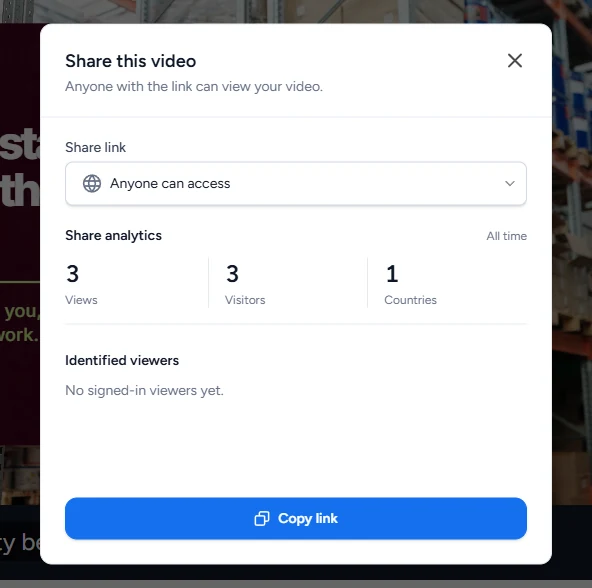
Share a deck and see who opened it
Not everyone needs to join the workspace. Invite reviewers to a single deck as Viewer or Editor, or share a link and follow its views in share analytics.
- Invite people to one deck as Viewer or Editor
- Share with anyone who has the link
- Views, visitors and countries
- See which signed-in viewers opened it
How SlideSpeak compares for an enterprise rollout
The differences that start to matter once a deck has to leave your company on your own template.
| Features |  | Generic AI slide makers | Building decks by hand |
|---|---|---|---|
| Your corporate template as the design source | Reads your slide master | Most apply their own themes | You already own the file |
| Deck generated from your PDF, Word or Excel files | PPTX, PDF, Word & Excel | Varies by tool | Manual copy-paste |
| Brand kit shared across the workspace | Logos, brand colors & fonts | Varies by tool | Kept in line by review |
| See whether a shared deck was opened | Share analytics | Varies by tool | Not for email attachments |
| Editable PowerPoint export | Native .pptx | Some export flattened slides | Native .pptx |
| API for programmatic generation | SlideSpeak API | Varies by tool | Not available |
| Narrated video and SCORM export | AI narration & SCORM | Varies by tool | Separate tools |
Customer stories
Teams already running on SlideSpeak
Consulting, strategy and product teams using SlideSpeak on their own templates and through the API.
The ability to upload our own template means our presentations always look professional and on-brand.

Boris Elbert
Consultant at BCG
SlideSpeak cut my report prep time in half. I upload the 80-page brief, get a summary in 30 seconds, and I'm already three steps ahead in the meeting.

Sarah Chen
Strategy Lead at Oliver Wyman

150+
Languages
Generate and translate presentations for every market your teams sell into.

50+
Slide layouts per template
Every custom layout in your slide master is available to the AI.
50M+
API calls per month
The scale the SlideSpeak API runs at today.

We use the SlideSpeak MCP and API to automate sales proposals and reports. This has helped us to streamline our sales process and close more deals by having more personalized presentations.
Jordon Cornish
CGO at Synkka
SlideSpeak AI ROI Calculator
Estimate the savings and ROI for your team using our interactive calculator.
Frequently asked questions
What teams usually want to know before rolling SlideSpeak out.
See it on your own template
Book a demo and we will generate a deck on your corporate template, with your brand applied, from a document your team already works from.