

Running out of API credits can interrupt your application and prevent new presentations from being generated. Fortunately, SlideSpeak’s Auto Top-Up feature helps you avoid this by automatically purchasing additional credits when your balance gets low.
In this guide, you’ll learn how Auto Top-Up works, how to configure it correctly, and how to avoid common mistakes.
What Is Auto Top-Up?
Auto Top-Up automatically purchases additional API credits when your available balance falls below a threshold that you choose.
Instead of manually monitoring your credit balance, SlideSpeak checks your remaining credits after each API request. Once your balance drops below your configured threshold, we automatically purchase and add more credits using your saved payment method.
As a result, your API requests can continue without interruption.
How Auto Top-Up Works
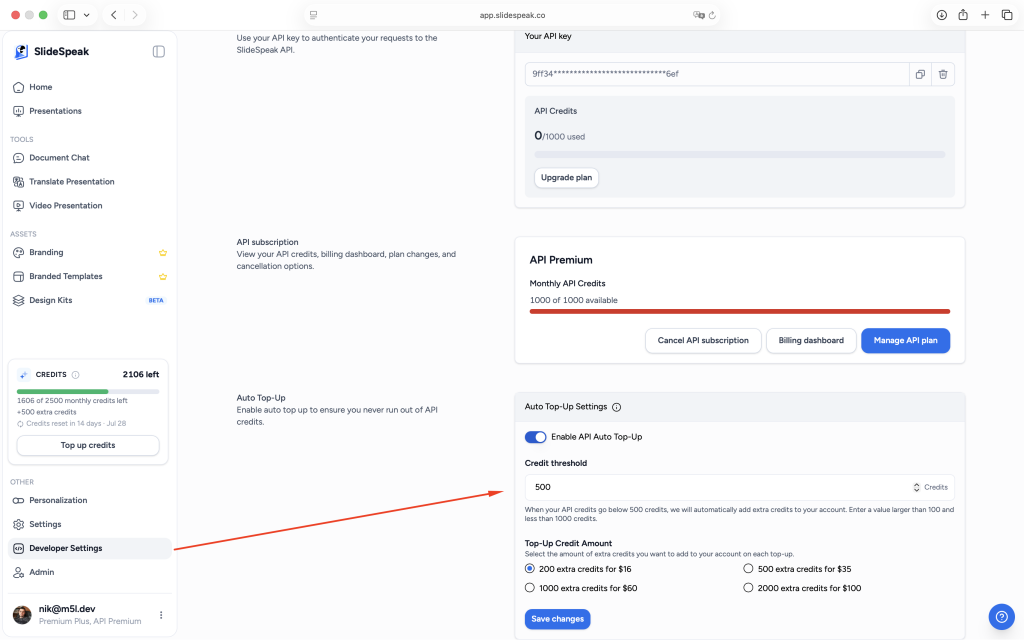
Auto Top-Up has two settings:
Credit Threshold
This is the credit balance that triggers a purchase.
For example, if you set your threshold to 500 credits, SlideSpeak will automatically purchase more credits as soon as your balance falls below 500.
Top-Up Amount
This determines how many credits SlideSpeak will purchase each time the threshold is reached.
You can currently choose from:
| Credits | Price |
|---|---|
| 200 credits | $16 |
| 500 credits | $35 |
| 1,000 credits | $60 |
| 2,000 credits | $100 |
The purchase is billed immediately to your saved payment method.
Important: Auto Top-Up Is Not Enabled by Default
Auto Top-Up is an optional feature.
If you want SlideSpeak to purchase credits automatically, you must enable Auto Top-Up before your balance reaches zero.
If Auto Top-Up is disabled and you run out of credits, your API requests will stop until you purchase additional credits manually.
Choosing the Right Credit Threshold
Your threshold should reflect how quickly your application consumes credits.
For example:
- If your application generates only a few presentations each day, a threshold of 200–500 credits may be sufficient.
- If your application generates hundreds or thousands of slides daily, you may want to choose a higher threshold to ensure you always have enough credits available.
Choosing the right threshold gives Auto Top-Up enough time to keep your application running smoothly.
Avoid Setting the Threshold Too High
One of the most common mistakes is setting the threshold almost as high as your current balance.
For example, imagine your account starts with 30,000 credits, but your Auto Top-Up threshold is set to 29,999 credits.
As soon as your application uses just one credit, your balance drops below the threshold, and Auto Top-Up immediately purchases more credits.
This behavior is expected, but it often surprises users who intended the top-up to happen much later.
Instead, choose a threshold that reflects the point where you genuinely want additional credits to be purchased.
Benefits of Auto Top-Up
Auto Top-Up helps you:
- Prevent interruptions to your API requests.
- Avoid manually monitoring your credit balance.
- Automatically purchase credits whenever they’re needed.
- Adjust your threshold and top-up amount at any time.
Frequently Asked Questions
Does Auto Top-Up enable itself automatically?
No. You must enable Auto Top-Up in your API billing settings before it can purchase credits automatically.
When does Auto Top-Up trigger?
Auto Top-Up triggers as soon as your remaining credit balance falls below your configured threshold.
Can I change my threshold later?
Yes. You can update both your credit threshold and your top-up amount whenever you like.
How are top-ups billed?
Each top-up is billed immediately using your saved payment method.
What happens if I don’t enable Auto Top-Up?
If your balance reaches zero, your API requests will stop until you purchase additional credits manually.
Need more help?
If you have any questions or need assistance, feel free to contact our support team at support@slidespeak.co