

Unlike our regular AI credits, which can be used inside our application itself, API credits can be used to generate slides using our API (see https://slidespeak.co/features/slidespeak-api).
Only successful API operations consume credits. Uploading source documents and downloading completed presentations do not use credits.
Currently the SlideSpeak API has two different versions and the credit pricing is different for SlideSpeak API v1 and SlideSpeak API v2. This is due to the fact that SlideSpeak API v2 uses newer and more advanced AI models, which cost more to run.
API v1 credit usage
API v1 is SlideSpeak’s presentation API.
| Action | Credit cost |
|---|---|
| Upload a document | 0 credits |
| Generate a presentation | 1 credit per generated slide |
| Generate a presentation slide by slide | 1 credit per generated slide |
| Generate or edit an outline | 1 credit per 5 outline slides, rounded up |
| Insert a slide | 1 credit |
| Regenerate a slide | 1 credit |
| Remove a slide | 0 credits |
| Edit an existing presentation | 1 credit per edit |
| Download/Export a presentation | 0 credits |
Presentation generation
When using the v1 presentation generation endpoint, one credit is deducted for every slide generated.
For example:
- A 5-slide presentation costs 5 credits.
- A 10-slide presentation costs 10 credits.
- A 25-slide presentation costs 25 credits.
The same rate applies when generating a presentation using the slide-by-slide endpoint.
Outline generation
Generating or editing an outline costs one credit for every five outline slides. The number of credits is rounded up to the next whole credit.
For example:
- An outline with 1 to 5 slides costs 1 credit.
- An outline with 6 to 10 slides costs 2 credits.
- An outline with 11 to 15 slides costs 3 credits.
- An outline with 16 to 20 slides costs 4 credits.
Generating an outline and generating the final presentation are separate API operations and are charged separately.
For example, generating a 10-slide outline costs 2 credits. Generating the resulting 10-slide presentation costs another 10 credits, resulting in a total cost of 12 credits.
Editing slides
Inserting or regenerating an individual slide costs one credit.
Removing a slide does not consume credits.
For example, regenerating two slides and removing one slide costs a total of two credits.
API v2 credit usage
API v2 uses SlideSpeak’s next-generation presentation system and supports design kits and automatic AI-generated designs.
Generating a presentation with API v2 costs:
5 credits per generated slide
For example:
- A 5-slide v2 presentation costs 25 credits.
- A 10-slide v2 presentation costs 50 credits.
- A 20-slide v2 presentation costs 100 credits.
API v1 and API v2 therefore have different credit rates. Make sure you check which API version your integration uses when estimating credit consumption.
For all other features, use SlideSpeak API v1.
FAQs
Do failed requests consume credits?
Only successful requests consume credits. Requests that fail validation or cannot be completed are not charged.
How can I check my remaining credits?
You can view your current credit balance directly in the SlideSpeak app. Click Developer Settings in the left-hand sidebar: your remaining API credits are shown next to your API key, along with your monthly API credit allowance.
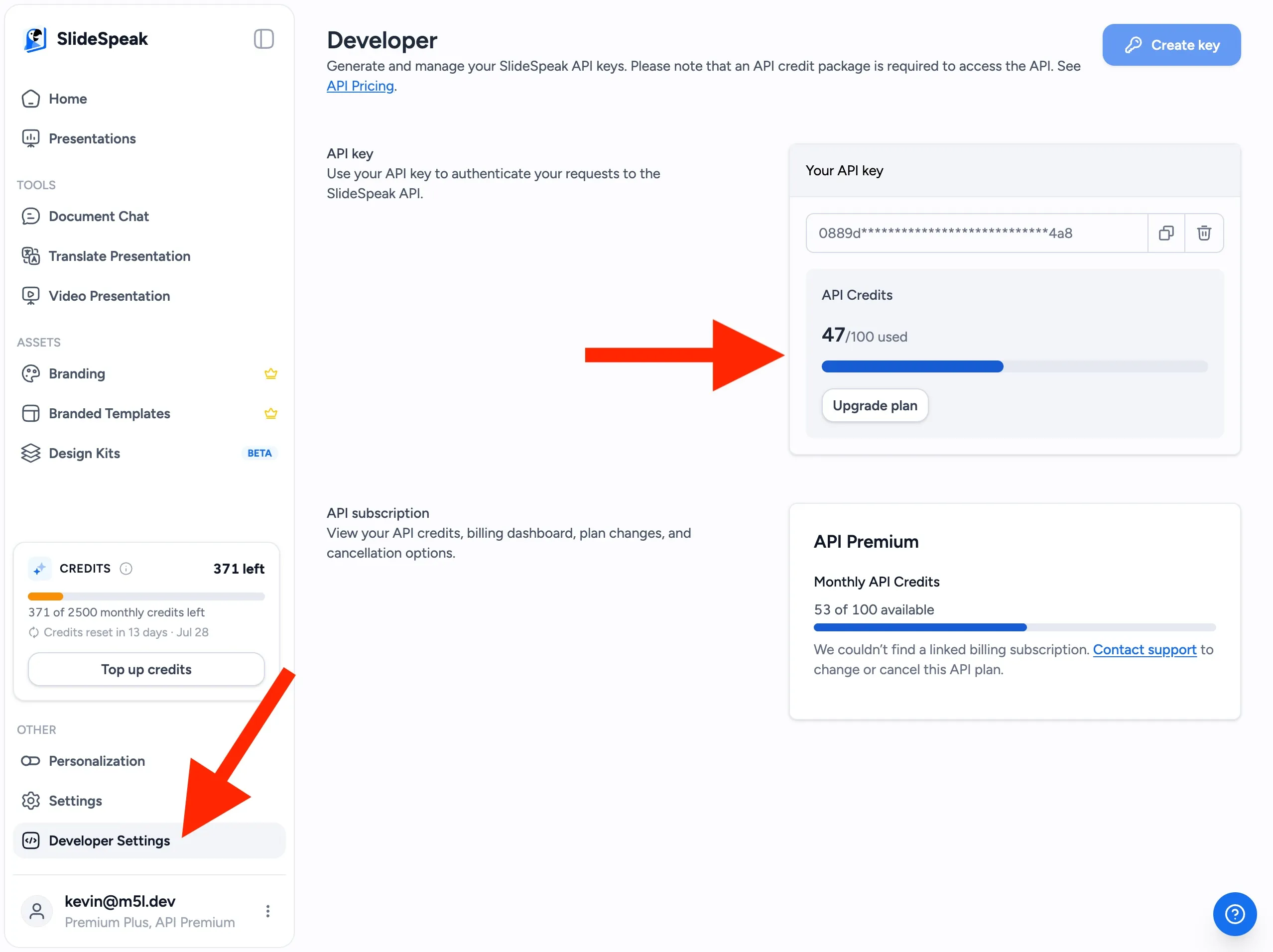
You can also retrieve your balance programmatically using:
GET /api/v1/me
The response includes your subscription API credits and any additional credits purchased through top-ups.
What happens when I run out of credits?
Presentation generation requests require a sufficient credit balance. If your account does not have enough credits, the API returns an INSUFFICIENT_API_CREDITS error.
You can purchase additional credits or enable Auto Top-Up from the Developer Dashboard. Auto Top-Up automatically purchases additional credits when your balance falls below a threshold you configure.
Need more help?
If you have any questions or need assistance, feel free to contact our support team at support@slidespeak.co