

You don't have to wait on the page while SlideSpeak works. It can email you when a new presentation is ready, and send you a download link when an export is finished. Both emails are on by default, and you can switch each one off in your account settings.
Before you start
- Plan: email notifications work on every plan, including Free.
- Where it lives: Settings → Account → Email preferences.
- Which address: SlideSpeak sends the emails to the email address of your SlideSpeak account.
Step 1: Open your account settings
Sign in at app.slidespeak.co. Click Settings at the bottom of the left sidebar. The Account tab opens. You can also open the menu under your profile picture and choose Account Settings.
Step 2: Choose your email preferences
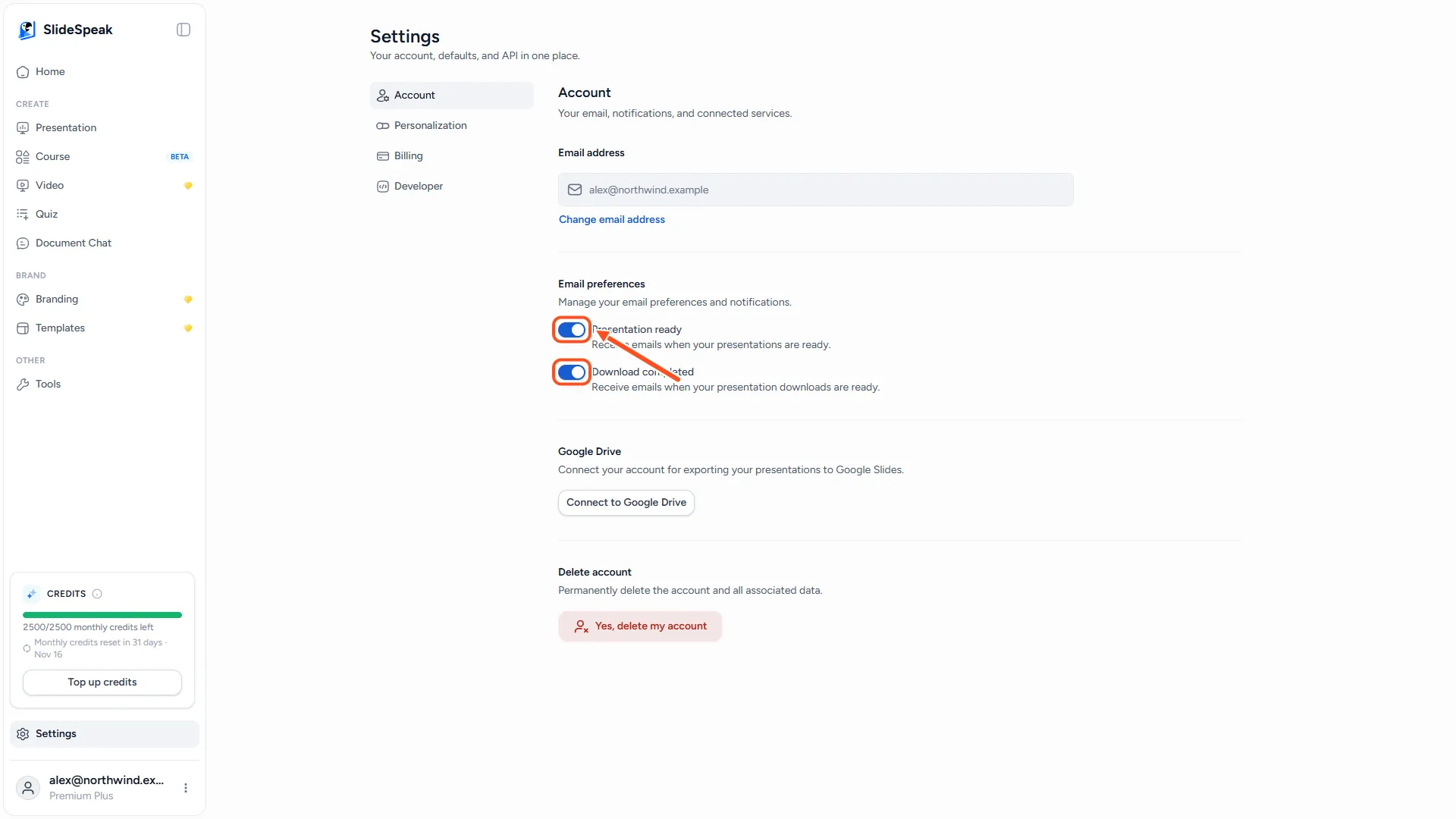
Scroll to Email preferences. You find two switches:
- Presentation ready: Receive emails when your presentations are ready.
- Download completed: Receive emails when your presentation downloads are ready.
Click a switch to turn that email on or off. SlideSpeak saves the change straight away and confirms with Your email preferences have been updated.
When does SlideSpeak send each email?
Presentation ready
SlideSpeak sends this email when a presentation made with SlideSpeak AI 4.0 has finished generating. The subject is Your SlideSpeak presentation is ready, and the View Presentation button opens it in the editor. You get the email whether or not you are still on the page.
You do not get this email:
- For presentations made with SlideSpeak AI 5.0. With AI 5.0 you watch the slides appear on screen, and the presentation opens in the editor as soon as it is finished. See how to choose a design in SlideSpeak AI 5.0.
- For presentations created in a team workspace (an organization).
- For presentations created through the SlideSpeak API.
- When a generation fails.
Download completed
SlideSpeak sends this email when one of these exports is ready:
- PowerPoint
- Google Slides
- An AI video (MP4)
The email contains a link to your file. The link works for 24 hours, so download the file before it expires. You can always export the presentation again for a fresh link.
While this email is switched on, the progress card in the bottom right corner of the editor tells you A link will also be sent to your email.
You do not get this email for a PowerPoint with narration or an LMS package. Those download directly in your browser.
Troubleshooting
- I don't receive any emails. Check that the switch is on in Email preferences, then look in your spam or promotions folder. Add SlideSpeak to your contacts so future emails reach your inbox.
- I didn't get a "Presentation ready" email. Check which model you used. Presentations made with SlideSpeak AI 5.0 do not send this email.
- The download link in the email doesn't work. Links expire after 24 hours. Open the presentation and download it again.
- I want fewer emails. Switch off either email above. Each email also has a Manage email preferences link that takes you to the same settings.
Need more help?
If you have any questions or need assistance, feel free to contact our support team at support@slidespeak.co