

SlideSpeak 4.0 vs 5.0 represents two different AI engines available in SlideSpeak, each designed for specific presentation needs. Understanding the difference helps you choose the right tool and manage your credits effectively.
SlideSpeak AI 4.0: The Standard Engine
SlideSpeak AI 4.0 is the standard presentation generator available across all SlideSpeak plans, including the free tier. This engine works with fixed templates and layouts, selecting the best existing design that matches your content.

Key Features of 4.0
- Design approach: Uses pre-designed templates and fixed layouts
- Output format: PowerPoint (.pptx) and PDF
- Credit cost: 1 credit per slide
- Availability: All plans (Free, Premium, Premium Plus, Enterprise)
- Best for: fast, cost-effective decks with a consistent, professional template look
For example, a typical 12-slide presentation costs approximately 12 credits when using SlideSpeak AI 4.0. This makes it the most economical choice for users who want polished decks at the lowest credit cost and want to maximize their credit usage.
SlideSpeak AI 5.0: The Advanced Engine
SlideSpeak AI 5.0 represents the advanced presentation engine that creates dynamic, custom layouts for each slide. Instead of picking from existing templates, AI 5.0 designs layouts from scratch based on what best suits each slide’s specific topic and content.
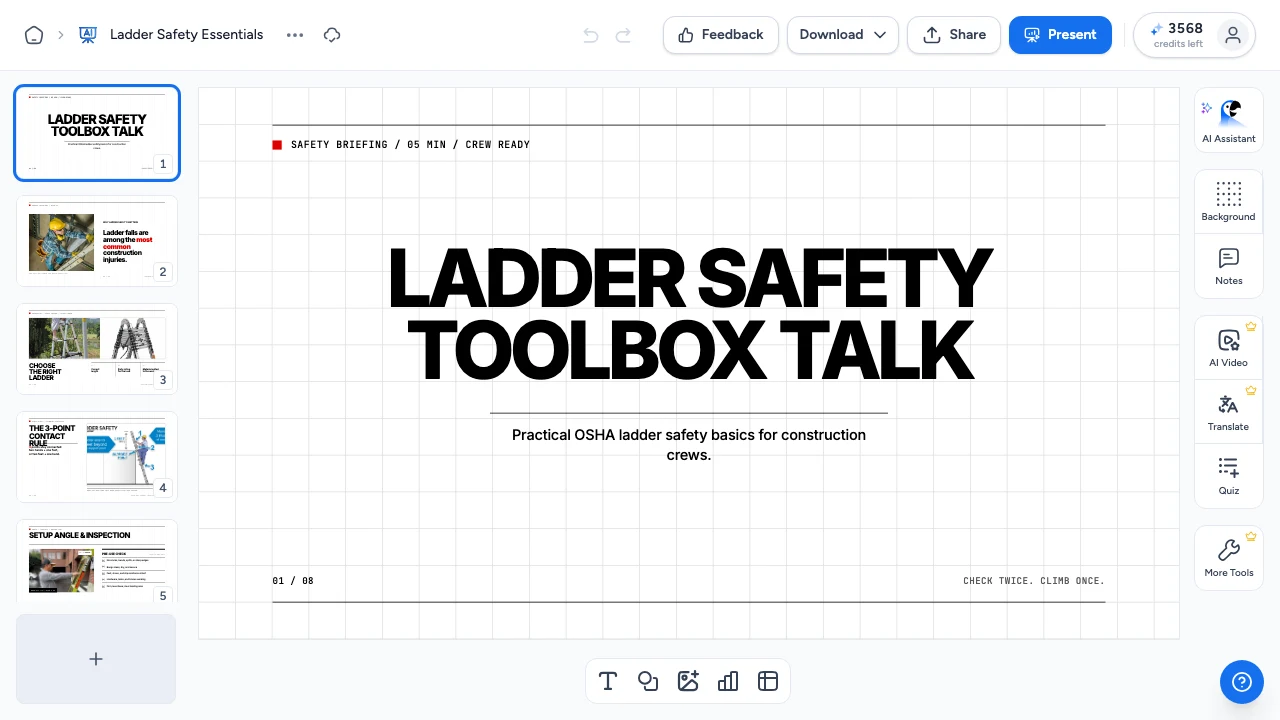
Key Features of 5.0
- Design approach: Fully creative layout design customized for each slide
- Output format: PowerPoint (.pptx) and PDF, same as 4.0
- Credit cost: 5 credits per slide
- Availability: Premium, Premium Plus, and Enterprise plans only
- Best for: Presentations requiring unique, custom-designed layouts tailored to specific content
A 12-slide presentation using SlideSpeak AI 5.0 costs approximately 60 credits. Therefore, this engine is ideal when you need custom-designed presentations where each slide’s layout is optimized for its specific content.
Direct Comparison: SlideSpeak 4.0 vs 5.0
Here’s a quick comparison table to help you decide which version fits your needs:
| Feature | SlideSpeak AI 4.0 | SlideSpeak AI 5.0 |
|---|---|---|
| Design Approach | Fixed templates & layouts | Dynamic custom layouts |
| Layout Creation | Selects from existing designs | Creates unique layouts per slide |
| Output Format | PowerPoint (.pptx) and PDF | PowerPoint (.pptx) and PDF |
| Credit Cost | 1 credit/slide | 5 credits/slide |
| Free Plan | Yes | No |
| Premium Plans | Yes | Yes |
| Cost for 12 slides | ~12 credits | ~60 credits |
Which Version Should You Use?
Choosing between SlideSpeak 4.0 vs 5.0 depends on your specific requirements and available credits.
Use SlideSpeak AI 4.0 when:
- You want a proven template look with predictable slide layouts
- Pre-designed templates work well for your content
- You want to maximize the number of presentations per credit allocation
- You’re working within the Free plan’s 100-credit limit
- You are working from a branded or custom template
Use SlideSpeak AI 5.0 when:
- You need fully custom layouts designed specifically for your content
- Each slide requires a unique design approach optimized for its topic
- You have Premium or higher plan access
- You have sufficient credits available (remember, it costs 5x more per slide)
- You want creative, dynamic presentations beyond standard template limitations
Credit Usage Examples by Plan
Understanding how many presentations you can create helps with planning. Here’s what your monthly credits can generate:
Premium Plan (1,000 credits/month)
- AI 4.0: Approximately 16 presentations (at 12 slides each)
- AI 5.0: Approximately 3 presentations (at 12 slides each)
Premium Plus Plan (2,500 credits/month)
- AI 4.0: Approximately 41 presentations (at 12 slides each)
- AI 5.0: Approximately 8 presentations (at 12 slides each)
In addition, these calculations assume average 12-slide presentations. Your actual numbers may vary based on the specific length of each presentation you create.
Understanding Credit Costs Across Features
SlideSpeak AI 4.0 and 5.0 aren’t the only features that use credits. Here’s how other SlideSpeak features compare:
- SlideSpeak AI 4.0: 1 credit per slide
- SlideSpeak AI 5.0: 5 credits per slide
- AI Video: 5 credits per slide (same cost as AI 5.0)
- Translation: 1 credit per slide
- AI Assistant: 1 credit per message
As a result, you can see that AI 5.0 and AI Video are positioned as premium features with higher credit requirements.
Upgrading Your Plan for AI 5.0 Access
If you’re currently on the Free plan and want to access SlideSpeak AI 5.0, you’ll need to upgrade to a paid subscription. Premium plans start with 1,000 monthly credits and include access to both AI engines, video generation, and other advanced features.
To upgrade your SlideSpeak subscription, visit your account settings or check the SlideSpeak pricing page for current plan options and features.
Frequently Asked Questions
Can I mix AI 4.0 and 5.0 in the same month?
Yes, you can use both engines within the same billing period. Your credits are pooled, so you can allocate them however you prefer across different features.
Does AI 5.0 produce better quality presentations?
Both engines produce high-quality presentations. AI 5.0 creates custom layouts designed specifically for each slide’s content, while AI 4.0 uses proven templates and fixed layouts. Choose based on whether you need custom-designed layouts or prefer working with established templates.
Can I convert a 4.0 presentation to 5.0 or vice versa?
Currently, presentations generated with one engine cannot be automatically converted to the other style. You would need to regenerate the presentation using your preferred engine.
What happens if I run out of credits mid-presentation?
SlideSpeak calculates credit requirements before generation begins. Therefore, if you don’t have enough credits for your requested presentation, the system will notify you before processing starts. You can then adjust your slide count, choose a different engine, or purchase additional credits.
Getting the Most from Your Credits
Regardless of which version you choose, here are some tips for managing your credit usage:
- Start with AI 4.0 for most standard presentations to conserve credits
- Reserve AI 5.0 for presentations where custom-designed layouts add significant value
- Monitor your credit balance regularly in your account dashboard
- Plan your monthly usage based on your subscription’s credit allocation
- Consider Premium Plus if you frequently need AI 5.0 or video features
Understanding the difference between SlideSpeak 4.0 vs 5.0 empowers you to make informed decisions about which engine to use for each project. Most users find that AI 4.0 meets their needs for everyday presentations, while AI 5.0 serves specialized requirements where custom-designed layouts provide unique value.
For more information about managing your SlideSpeak credits, check out our guide on how credits work in SlideSpeak.
Need more help?
If you have any questions or need assistance, feel free to contact our support team at support@slidespeak.co