Convert Excel data to PowerPoint with AI
Upload any .xlsx or .xls file and get a complete PowerPoint presentation in seconds. Our AI creates charts, highlights key metrics, and summarizes your data into clean, professional slides — for free.

Upload your Excel file here
Drag and drop or click to upload
Trusted by consulting and enterprise teams





How to Convert Excel to PowerPoint in 3 Steps
Upload your spreadsheet, let the AI generate charts and insights, and download a ready-to-present PowerPoint deck.

Upload Excel file
Drag and drop any .xlsx or .xls spreadsheet. No file size limits, no signup, your data stays private and secure.
Introduction to the presentation on
Overview of the importance of effective commu...
AI creates charts and insights
The AI scans your spreadsheet to detect trends, key metrics, and patterns, then automatically generates bar, line, and pie charts for your slides.
Download your PowerPoint
Get a complete, editable PowerPoint presentation with professional layouts, data visualizations, and summaries. Export as PPTX, Google Slides, PDF or edit in our AI presentation editor.
Turn Excel data into slides with charts, insights, and a storyline
Our AI-powered converter gives you complete control over your presentations while saving you valuable time on formatting and content structuring.
AI-generated charts, graphs, and infographics
Key insights extracted from your data
Sales
2,000
New Customers
1,200
Top Region
Latin America
Based on facts and numbers, no AI hallucinations
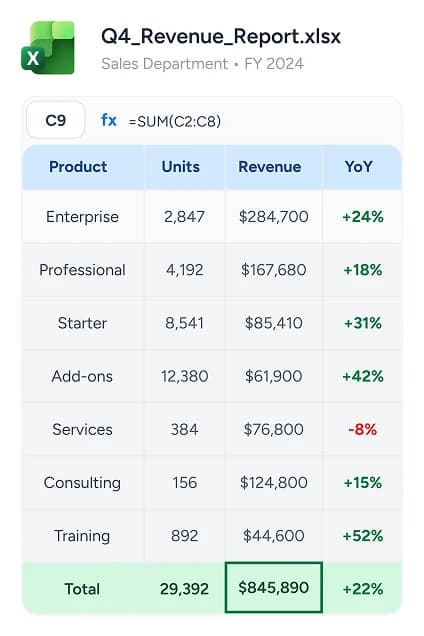
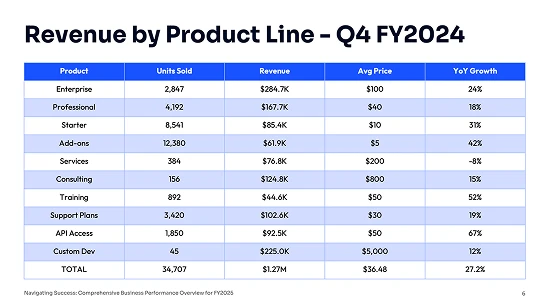
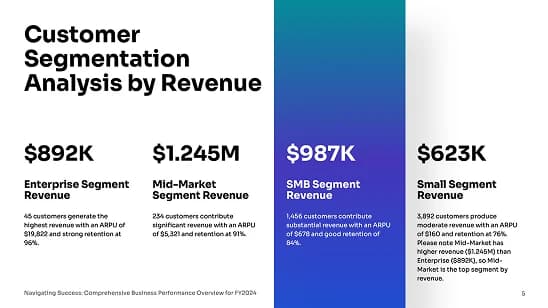
Advanced features for any Excel file
Whether your spreadsheet has multiple sheets, complex formulas, or is in another language, SlideSpeak handles it and generates a ready-to-use PowerPoint or Google Slides deck.
CSV and Google Sheets import
Import CSV files or connect your Google Sheets directly. SlideSpeak will read your data and generate a complete presentation — no need to convert to Excel first.


Multi Language Support
Generate presentations in any language, regardless of what language your Excel data is in. SlideSpeak automatically translates and adapts your slides to your target audience.
Multi-Sheet Support
Upload workbooks with multiple sheets and tabs. Our AI intelligently organizes content from different sheets into a cohesive presentation flow.
Formula Recognition
Our AI understands Excel formulas and calculations. SUM, AVERAGE, VLOOKUP—we extract computed values and present them with context.


AI presentations with your own template
Upload your PowerPoint or Google Slides template and generate presentations that match your existing layout, fonts, and structure. Check out our Branded Template feature.


PowerPoint and Google Slides Compatible
Easily export your fully editable presentations to PowerPoint or Google Slides, allowing you to customize and share them effortlessly with your team or audience.
Wall of Love
Loved by professionals worldwide
From professionals crafting data-driven reports to educators streamlining lesson preparation, thousands worldwide rely on SlideSpeak to work faster and present better.
This tool has significantly cut my prep time by automating slide creation, letting me focus on refining the material to suit my teaching style. Instead of building slides from scratch, SlideSpeak generates a polished presentation that I can easily edit.
James Garza
Lecturer at CCT College Dublin

The ability to upload our own template means our presentations always look professional and on-brand.
Boris Elbert
Consultant at BCG

2M+
Presentations generated

98%
User satisfaction
Question you have, answered right here.
Everything you need to know about the product. Can't find the answer you're looking for? Please chat to our friendly team.
Learn how to let data drive your PowerPoints
From engaging slides to a consistent storyline. Read our blog posts to learn how to utilize AI to create better PowerPoint presentations and more.


Keep going with these tools
The tools people reach for next, plus the SlideSpeak features behind them.


Upload an Excel and get an AI Presentation in seconds
An AI presentation platform to turn spreadsheets, PDFs, Word, and ideas into ready-to-present slides.