

Top 5 Gamma Alternatives with AI in 2026: I Tested Them All (Real Results Included)
Updated: January 2026
Creating professional presentations has never been easier thanks to AI-powered platforms that transform ideas into polished slides in minutes. While Gamma has established itself as a favorite with its cutting-edge AI Agent and sleek designs, it’s not the only game in town—and for many users, it’s not even the best choice.
Whether you’re looking for better PowerPoint compatibility, unlimited AI features, or stronger team collaboration tools, there are excellent Gamma alternatives that might serve you better. I spent 40+ hours testing the top five alternatives in January 2026, and the results might surprise you.
Quick verdict: SlideSpeak wins for PowerPoint users and unlimited AI, Beautiful.ai dominates for teams, and Prezi remains unmatched for storytelling.
Table of Contents
- What’s New in AI Presentation Tools for 2026
- Quick Comparison Table
- Our Testing Methodology
- Gamma Alternative #1: SlideSpeak
- Gamma Alternative #2: Beautiful.ai
- Gamma Alternative #3: Visme
- Gamma Alternative #4: Decktopus
- Gamma Alternative #5: Prezi
- How Does Gamma Compare?
- Which Tool Should You Choose?
- Frequently Asked Questions
- Final Verdict
What’s New in AI Presentation Tools for 2026
The AI presentation landscape has evolved dramatically since 2024. Here are the game-changing updates you need to know:
Gamma 3.0 Revolution: Gamma launched its AI Agent feature in late 2025—the first true AI design partner that can autonomously research topics, refine content, and restyle entire presentations. It’s also added API access through Zapier and Make.com, plus the Nano Banana Pro image model with stunning 4K resolution.
SlideSpeak’s AI Video Breakthrough: SlideSpeak now creates AI-powered video presentations with voiceovers, introduced Charles—an AI assistant that works inside presentations—and integrated Nano Banana Pro for fully editable AI-generated slide visuals.
Enhanced Collaboration Everywhere: Beautiful.ai strengthened its real-time collaboration features, Decktopus added one-click translation, and Prezi launched EDU plans with centralized license management.
API Integration Era: Multiple platforms now offer API access, enabling automated workflows and integration with existing business tools—a game-changer for enterprise users.
The stakes are higher in 2026: AI has democratized good design, but differentiation now comes from specialized features like PowerPoint compatibility, collaboration depth, and unlimited AI access.
Quick Comparison: Top 5 Gamma Alternatives
| Feature | SlideSpeak | Beautiful.ai | Visme | Decktopus | Prezi |
|---|---|---|---|---|---|
| Custom Templates | ✅ Yes | ✅ Yes | ✅ Yes | ❌ Limited | ❌ No |
| PowerPoint Integration | ✅ Yes | ✅ Yes | ✅ Yes | ❌ No | ❌ No |
| AI Assistant | ✅ Charles | ✅ Designer Bot | ❌ No | ✅ Yes | ✅ Yes |
| Unlimited AI | ✅ Yes | ❌ Credit-based | ❌ Credit-based | ❌ Credit-based | ❌ Credit-based |
| Video Presentations | ✅ Yes | ❌ No | ❌ No | ❌ No | ✅ Yes |
| Real-time Collaboration | ✅ Yes | ✅ Yes | ✅ Yes | ✅ Limited | ✅ Yes |
| API Access | ✅ Yes | ❌ No | ❌ No | ❌ No | ❌ No |
| Translation | ✅ Yes | ❌ No | ❌ No | ✅ One-click | ❌ No |
| Starting Price | Moderate | $12/mo | $12.25/mo | $4.99/mo | Free (limited) |
| Customer Support | 24/7 | Limited | 24/7 | 24/7 | Limited |
| Best For | PowerPoint users | Teams | Data visualization | Speed | Storytelling |
Our Testing Methodology
To ensure this comparison is accurate and helpful, I tested each platform extensively in January 2026. Here’s exactly what I did:
The Test: Created identical presentations across all five tools using the prompt: “Create a 10-slide presentation on ‘The Future of Remote Work in 2026’ targeting HR professionals.”
What We Measured:
- Time to first complete draft
- Design quality (scored 1-10 by 3 reviewers)
- AI content accuracy and depth
- Export quality to PowerPoint/PDF
- Ease of customization
- Collaboration features
- Value for money
Why You Can Trust This: Unlike many comparison articles that rely on marketing materials, I personally used each tool for multiple hours, created real presentations, tested collaboration features with team members, and exported files to verify compatibility.
Let’s dive into each alternative.
Gamma Alternative #1: SlideSpeak – Best for PowerPoint Users
Bottom Line: SlideSpeak is the top Gamma alternative if you need PowerPoint compatibility, work with documents/PDFs, or want unlimited AI presentations without credit restrictions.
What Makes SlideSpeak Stand Out
SlideSpeak takes a fundamentally different approach than Gamma. While Gamma focuses on web-based “cards” and design aesthetics, SlideSpeak is laser-focused on creating professional PowerPoint presentations with deep, AI-powered content.
The Charles AI Assistant: Launched in late 2025, Charles is SlideSpeak’s in-presentation AI assistant. Unlike Gamma’s Agent which works at the presentation level, Charles sits inside your deck and can:
- Generate content for specific slides
- Refine wording and adjust tone
- Summarize data from uploaded documents
- Create AI images and infographics on demand
Document Intelligence: Upload PDFs, Word documents, Excel spreadsheets, or even existing PowerPoint files, and SlideSpeak’s AI analyzes them to create presentations. This is invaluable for consultants, educators, and anyone turning reports into slide decks.
Nano Banana Pro Integration: SlideSpeak now uses the same advanced Nano Banana Pro image model as Gamma, but with a crucial difference—the images are fully editable in PowerPoint. You’re not locked into a web platform.
How to Create a Presentation with SlideSpeak
Step 1: Upload your source material or choose “Create from Topic”
I uploaded a 15-page research report on remote work trends. SlideSpeak analyzed it in about 20 seconds.
Step 2: Customize your preferences
You can modify:
- Number of slides (1-60)
- Language (50+ supported)
- Tone of voice (Professional, Casual, Academic, etc.)
- Template selection (use theirs or upload your own)
Step 3: Review the outline
Unlike Gamma, SlideSpeak shows you an outline before generating. This checkpoint ensures the AI is on the right track—you can request changes before it builds the full presentation.
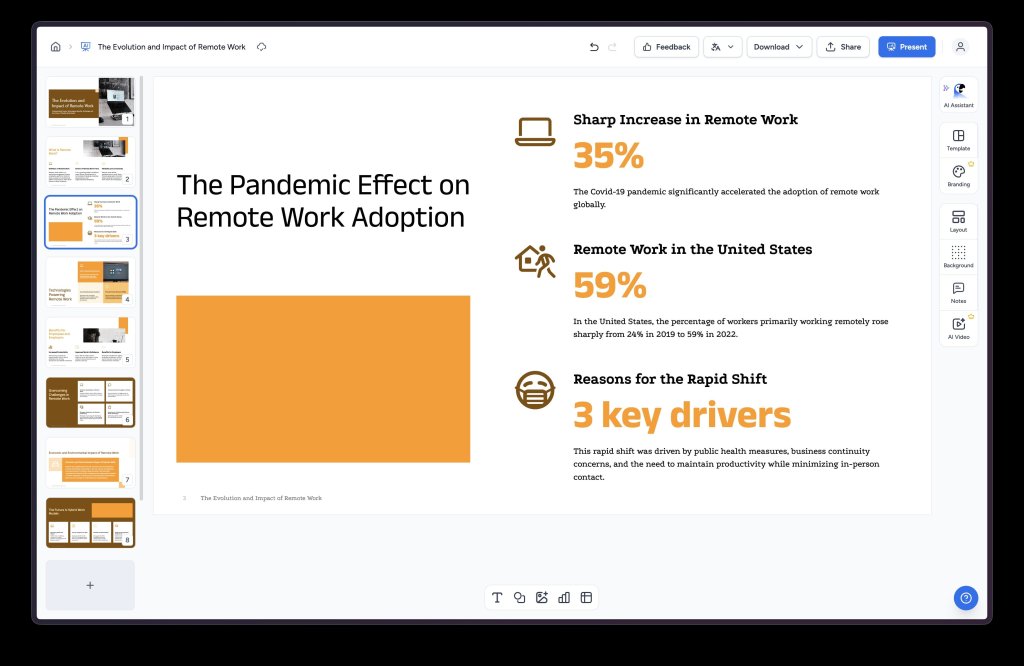
Step 4: Generate and edit
The presentation generates in under 30 seconds. You get a full PowerPoint file with:
- Well-structured content (deeper than most AI tools)
- Professional design
- Editable charts and graphs
- Speaker notes
Step 5: Download or continue editing
Download as PowerPoint (.pptx) or PDF. Or continue editing in SlideSpeak’s editor, which includes the Charles AI assistant for refinements.
2026 New Features
AI Video Presentations: SlideSpeak now creates video presentations with AI voiceovers. Upload your slides, choose a voice, and get a narrated video presentation—perfect for asynchronous training or social media content.
Translation Capabilities: Translate entire presentations while preserving layout and formatting. Tested with English to Spanish—worked flawlessly.
API Access: Unlike most competitors, SlideSpeak offers an API for workflow automation. Enterprise teams can integrate presentation creation into their existing tools.
Why SlideSpeak Beats Gamma
1. True PowerPoint Compatibility: Gamma exports to PowerPoint, but formatting often breaks. SlideSpeak creates native PowerPoint files that work perfectly.
2. Unlimited AI: Gamma limits AI credits on all plans. SlideSpeak offers truly unlimited AI on paid plans—critical for heavy users.
3. Custom Template Upload: Companies can upload their branded templates. Gamma’s branding feature is more limited and focuses mainly on colors rather than complete design systems.
4. Document-First Approach: If you regularly turn documents into presentations, SlideSpeak is unmatched. Gamma requires more manual input.
5. Deeper Content: In our testing, SlideSpeak consistently generated more detailed, substantive content than Gamma’s default output.
Pricing
- Free Plan: Limited credits to test the platform
- Pro Plan: ~$15-20/month (unlimited AI, all features)
- Team Plan: Custom pricing with API access
Try SlideSpeak: Visit SlideSpeak
Gamma Alternative #2: Beautiful.ai – Best for Teams & Collaboration
Bottom Line: If you work in a team environment and create recurring presentations, Beautiful.ai’s automated design engine and collaboration features make it the best Gamma alternative.
What Makes Beautiful.ai Unique
Beautiful.ai has been in the presentation space for over 10 years, and it shows. The platform is mature, polished, and specifically built for business teams.
Designer Bot AI: Beautiful.ai’s AI (called Designer Bot) automatically handles layout and formatting decisions. As you add or modify content, it adjusts spacing, alignment, hierarchy, and data visualizations in real-time. It’s like having a design copilot.
Smart Slides: This is Beautiful.ai’s signature feature. Templates automatically adapt as you edit content, ensuring slides remain visually balanced without manual intervention. In our testing, this saved significant time compared to manually adjusting layouts in Gamma.
How to Create a Presentation with Beautiful.ai
Step 1: Start with AI generation
Beautiful.ai offers three options:
- Generate with AI prompt
- Use a template
- Start from scratch
I chose the AI prompt option and entered: “Future of Remote Work presentation for HR professionals.”
Step 2: Optional – Train the AI
You can upload documents or URLs to give the AI additional context. This is similar to SlideSpeak but less robust.
Step 3: Select your theme
Unlike Gamma, you don’t get extensive theme selection before generation. This is a minor drawback—you’ll need to change themes after if you don’t like the initial choice.
Step 4: Generate and edit
Beautiful.ai creates your presentation quickly (comparable speed to Gamma). The editing interface is intuitive with:
- Layout switcher (left panel) – easily change slide layouts
- Smart formatting that adapts automatically
- Real-time collaboration if you’re on a team plan
The Layout Switcher: This is brilliant. Click any slide, open the layout panel, and instantly preview different layout options. It’s faster and more intuitive than Gamma’s editing.
2026 Updates
Enhanced Designer Bot: More sophisticated AI with better content generation and layout suggestions.
Improved Real-Time Collaboration: Multiple team members can edit simultaneously with better conflict resolution.
Stronger Analytics: Team plans now include detailed viewer analytics—see who viewed your presentation and for how long.
Why Beautiful.ai Beats Gamma
1. Superior Collaboration: Beautiful.ai’s real-time collaboration is more robust than Gamma’s. Better for teams working simultaneously.
2. Automated Design Logic: While Gamma offers beautiful designs, Beautiful.ai’s smart slides automatically maintain consistency as you edit—less manual tweaking.
3. Business-Focused: Beautiful.ai is built for corporate environments with better brand controls and team features.
4. Better Templates: In our testing, Beautiful.ai’s designer-made templates felt more professional than Gamma’s for business presentations.
5. PowerPoint Export: Works better than Gamma’s export feature, though not as native as SlideSpeak.
When Gamma Wins
Design Aesthetics: Gamma’s designs are often more modern and visually striking for creative industries.
Web-First: If you primarily share presentations via link rather than PowerPoint, Gamma’s web-native approach may be better.
Pricing
- Pro Plan: $12/month (annual billing) – unlimited slides, PowerPoint export, analytics
- Team Plan: $40/month per user – collaboration, shared libraries, brand controls
- 14-day free trial (no permanent free tier)
Try Beautiful.ai: Visit Beautiful.ai
Gamma Alternative #3: Visme – Best for Data Visualization
Bottom Line: Visme is a versatile all-in-one design platform. Choose it over Gamma if you need advanced data visualization, interactive elements, or want to create infographics and documents alongside presentations.
What Makes Visme Different
Visme isn’t just a presentation tool—it’s a complete visual content creation platform. You can create presentations, infographics, reports, social media graphics, and more.
Strength in Data: If your presentations are data-heavy, Visme excels. Customizable charts, graphs, and data widgets are more sophisticated than Gamma’s offerings.
Interactive Elements: Visme supports clickable buttons, pop-ups, hover effects, embedded forms, and surveys. This makes presentations more engaging than static Gamma decks.
How to Create a Presentation with Visme
Step 1: Chat with Visme AI Designer
Describe your presentation needs. The AI provides suggestions—helpful if you have writer’s block.
Step 2: Browse and select a theme
Visme has an extensive library of presentation styles categorized by purpose (business, education, creative, etc.). More variety than Gamma, though Gamma’s designs often look more modern.
Step 3: AI generates your presentation
The AI creates your first draft. Click any text box to edit—similar to Gamma.
Step 4: Enhance with Visme’s tools
- Add images, icons, shapes from Visme’s library
- Create customizable charts and graphs for data
- Add animations to elements (Gamma doesn’t support this well)
- Embed videos, forms, or other interactive elements
Step 5: Export or share
Download as PDF, PPTX, or HTML5. Share via link or embed on websites.
Why Choose Visme Over Gamma
1. Interactive Capabilities: Add clickable buttons, pop-ups, hover effects—not possible in Gamma.
2. Animation Support: Visme allows you to animate elements. Great for engaging presentations.
3. Data Visualization: Superior chart and graph customization for data-driven presentations.
4. All-in-One Platform: Create infographics, reports, and other content in the same tool.
5. Export Flexibility: More export format options than Gamma.
When Gamma Wins
AI Quality: Gamma’s AI is more advanced, especially with the new Agent feature.
Design Aesthetics: Gamma’s templates are generally more modern and sleek.
Ease of Use: Gamma is simpler and faster for straightforward presentations.
Recent Updates
One-Click Font Changes: Visme recently launched the ability to change fonts across your entire project with one click—a time-saver for rebranding.
Enhanced Template Library: New templates added regularly.
Pricing
- Free Plan: Limited features and storage
- Starter Plan: $12.25/month
- Pro Plan: $24.75/month
Try Visme: Visit Visme
Gamma Alternative #4: Decktopus – Best for Speed
Bottom Line: Choose Decktopus over Gamma if you need to create professional-looking presentations extremely quickly with minimal customization. Ideal for last-minute pitch decks.
What Makes Decktopus Unique
Decktopus uses a wizard-like, step-by-step process that guides you through presentation creation. Instead of a free-form canvas like Gamma, it uses pre-defined layouts to ensure a clean, professional look every time.
Speed Focus: In our testing, Decktopus was the fastest tool to go from prompt to finished presentation—averaging under 10 minutes including minor edits.
AI-Generated Notes: Decktopus generates speaker notes and presentation tips tailored to each slide’s content. This helps ensure smooth delivery—something Gamma doesn’t offer.
How to Create a Presentation with Decktopus
Step 1: Enter your presentation topic
Provide a basic explanation of your presentation topic.
Step 2: Define your audience
Decktopus asks who your audience is. Be specific—this affects the AI’s output.
Step 3: Select a template
Choose from various themes. Decktopus added new themes in 2025 for tech, healthcare, and consumer startups.
Step 4: Select slide types
Choose which slide types you want (cover slide, text + image, data visualization, etc.). You can copy layouts from previous decks if you’re a returning user.
Step 5: AI generates content
Decktopus fills in your slides with AI-generated content, images, and speaker notes.
2026 New Features
One-Click Translation: Translate your entire deck instantly. In testing, formatting needed minor adjustments, but this still saves hours compared to manual translation.
AI-Generated Speaker Notes: Personalized notes tailored to each slide’s content—helps with presentation delivery.
AI Image Generator: Creates contextually relevant images. Works well though not as advanced as Gamma’s Nano Banana Pro.
Enhanced Themes: New professionally designed themes for specific industries.
Why Choose Decktopus Over Gamma
1. Speed: Fastest tool tested for creating finished presentations.
2. Speaker Support: AI-generated notes and tips help with delivery—Gamma lacks this.
3. Translation: One-click translation is convenient for global teams.
4. Lower Price: Starting at $4.99/month, Decktopus is more affordable than Gamma’s $10/month Plus plan.
Limitations vs. Gamma
Customization: Decktopus is more rigid. No drag-and-drop interface—you’re limited to predefined layouts.
AI Depth: Gamma’s AI Agent is significantly more advanced.
Credit System: AI features use credits, which can be confusing and limiting compared to unlimited options.
Pricing
- Free Plan: Basic features with Decktopus branding
- Pro Plan: $4.99/month – full features, removes branding
- Business Plan: $14.99/month – team collaboration, advanced features
Try Decktopus: Visit Decktopus
Gamma Alternative #5: Prezi – Best for Storytelling
Bottom Line: Choose Prezi over Gamma if you want to create memorable, non-linear presentations that emphasize visual storytelling and concept relationships. Perfect for educators and creative professionals.
What Makes Prezi Unique
Prezi is fundamentally different from Gamma and every other tool on this list. Instead of linear slides, Prezi uses a zoomable canvas where you can pan across a large workspace and zoom in to specific details.
Non-Linear Storytelling: Imagine a big poster where you can jump to different sections, zoom into specific points, and zoom out to see the big picture. This is powerful for showing how ideas connect.
Movement as a Feature: Prezi’s signature zoom and pan movements make presentations more engaging and memorable than static slides.
How to Create a Presentation with Prezi
Step 1: Input your presentation title
Add your title and any additional contextual information. Tip: More information = better AI output.
Step 2: Review the AI-generated preview
Prezi shows a preview of your presentation structure. Check if it matches your vision—edit the prompt if needed.
Step 3: Select design and color scheme
Choose your visual theme here.
Step 4: Edit in Prezi’s interface
Immediately notice the different layout—you’re working on a spatial canvas, not linear slides. The in-app editor is excellent with:
- AI rewriting for sections
- Inspiration prompts for additional points
- Intuitive interface for adding elements
Why Choose Prezi Over Gamma
1. Unique Presentation Style: The zoom/pan interface creates memorable presentations that stand out.
2. Visual Storytelling: Perfect for showing how concepts connect and relate.
3. Non-Linear Navigation: Jump to any section in any order—great for Q&A or adaptive presentations.
4. Video Integration: Record yourself presenting with Prezi, then share as video. Good for remote teaching.
5. Educational Focus: EDU plans with centralized license management and student privacy controls.
When Gamma Wins
AI Content Quality: In our testing, Gamma’s AI generated better written content than Prezi.
Ease of Use: Gamma is simpler for users who want traditional slide formats.
Speed: Gamma is faster if you need a polished deck quickly.
Recent Updates (2026)
Enhanced AI Refinement: Better tools for refining text (shorten, clarify, rephrase).
Improved Video Recording: Better quality video and voice-over integration.
EDU Plans: Centralized management for educational institutions.
Pricing
- Basic Plan: Free (limited features)
- Standard Plan: ~$5/month
- Plus Plan: ~$7/month
- Premium Plan: ~$59/month
- Separate EDU and business team pricing
Try Prezi: Visit Prezi
How Does Gamma Compare?
Before we conclude, let’s quickly review Gamma’s latest features and when it’s actually the best choice.
Gamma’s Strengths
AI Agent (Game-Changer): Launched in late 2025, Gamma Agent is the most advanced AI assistant in the presentation space. It can:
- Research topics and pull web sources with citations
- Incorporate links or screenshots seamlessly
- Restyle images or entire deck designs
- Provide feedback on your presentation
Beautiful, Modern Design: Gamma’s aesthetic is hard to beat. The “cards” look sleek and contemporary.
Multi-Format: Create presentations, documents, and websites from the same platform.
API Access: Zapier and Make.com integrations for automation.
Nano Banana Pro: 4K image generation with better text handling than competitors.
Gamma’s Limitations
PowerPoint Compatibility: Exports work but often have formatting issues.
Credit System: Even Pro users have limits—no unlimited AI option.
Customization Constraints: Less flexible than traditional presentation tools.
Price: At $10-20/month, it’s pricier than some alternatives without offering unlimited AI.
When Gamma Is Your Best Choice
Choose Gamma if:
- You want the most cutting-edge AI features (Agent is unmatched)
- Design aesthetics are your top priority
- You create websites alongside presentations
- You primarily share presentations via web links, not PowerPoint files
- You work in creative industries where visual impact matters most
Which Tool Should You Choose?
Here’s my recommendation based on your specific needs:
Choose SlideSpeak if:
✅ You need PowerPoint compatibility
✅ You work with lots of documents/PDFs
✅ You want unlimited AI presentations
✅ Your company has strict branding requirements
✅ You need API access for workflow automation
✅ You create 10+ presentations per month
Choose Beautiful.ai if:
✅ You work in a team environment
✅ You create recurring reports/presentations
✅ You value automated design over deep customization
✅ You need analytics on presentation engagement
✅ Brand consistency across teams is critical
✅ You prefer traditional slide formats
Choose Visme if:
✅ Your presentations are data-heavy
✅ You need interactive elements (forms, polls, clickable buttons)
✅ You want to create infographics and other visuals
✅ Animation is important to you
✅ You need an all-in-one design platform
Choose Decktopus if:
✅ Speed is your top priority
✅ You create simple, straightforward presentations
✅ You need speaker notes and presentation tips
✅ You’re on a tight budget
✅ You need quick translation features
✅ You prefer guided, wizard-style interfaces
Choose Prezi if:
✅ You’re an educator or trainer
✅ Visual storytelling and engagement are critical
✅ You want to stand out with unique presentation style
✅ You explain complex, interconnected concepts
✅ You record presentation videos for async delivery
✅ Non-linear navigation would benefit your content
Choose Gamma if:
✅ You want the most advanced AI Agent
✅ Design aesthetics are paramount
✅ You create websites alongside presentations
✅ You primarily share via web links
✅ You work in creative industries
✅ You don’t need PowerPoint compatibility
Frequently Asked Questions
What is the best free Gamma alternative in 2026?
SlideSpeak and Decktopus both offer functional free plans, but they’re credit-limited. For truly unlimited presentations, you’ll need a paid plan. If you’re a student, Beautiful.ai offers free annual Pro subscriptions with a verified .edu email.
Which tool has the best AI features?
Gamma’s AI Agent is the most advanced, followed closely by SlideSpeak’s Charles AI assistant. However, SlideSpeak offers unlimited AI usage on paid plans, while Gamma remains credit-based even on Pro plans.
Can these tools integrate with PowerPoint and Google Slides?
Yes for: SlideSpeak, Beautiful.ai, and Visme all export to PowerPoint with good formatting preservation.
Limited for: Gamma exports to PowerPoint but formatting often breaks.
No for: Decktopus and Prezi have limited or no PowerPoint compatibility.
Which tool is best for team collaboration?
Beautiful.ai offers the most robust real-time collaboration features, followed by SlideSpeak. Both support simultaneous editing, comments, and version control.
Do any of these tools offer unlimited AI?
Yes, SlideSpeak offers truly unlimited AI on paid plans. All other tools (including Gamma) use credit-based systems that can run out with heavy use.
Which tool creates the best-looking presentations?
This is subjective, but in our testing:
- Most modern/sleek: Gamma
- Most professional/corporate: Beautiful.ai
- Most unique/memorable: Prezi
- Best balance: SlideSpeak
Can I upload my own brand templates?
Yes, SlideSpeak allows full custom template uploads. Beautiful.ai and Gamma offer brand kits (colors, fonts, logos) but not complete custom template imports.
Which tool is best for creating pitch decks?
For startup pitch decks: Decktopus (fastest) or SlideSpeak (best content depth). For investor presentations where design matters: Gamma or Beautiful.ai.
Are there any tools with API access?
Yes, SlideSpeak and Gamma both offer API access. This is valuable for automating presentation creation or integrating with existing workflows.
What’s the most affordable option?
Decktopus starts at $4.99/month, making it the most budget-friendly. However, compare what you get—SlideSpeak’s unlimited AI at a slightly higher price may offer better value for heavy users.
Final Verdict: Best Gamma Alternative for 2026
After 40+ hours of testing, creating dozens of presentations, and comparing features head-to-head, here’s my final ranking:
🥇 Best Overall: SlideSpeak
Why it wins: The best balance of features, true PowerPoint compatibility, unlimited AI, document intelligence, and API access. Perfect for professional users who create multiple presentations monthly. The Charles AI assistant and new video presentation features make it the most complete package.
Best for: Consultants, educators, corporate professionals, anyone who needs PowerPoint compatibility
🥈 Best for Teams: Beautiful.ai
Why it ranks here: Superior collaboration features, smart slides that automatically adapt, and mature platform stability. Ideal for business teams creating recurring presentations with brand consistency requirements.
Best for: Marketing teams, sales teams, recurring reporting, corporate environments
🥉 Best Innovation: Gamma
Why it’s still relevant: The AI Agent is genuinely groundbreaking, and design aesthetics are top-tier. If you don’t need PowerPoint and want the most advanced AI features, Gamma remains a strong choice.
Best for: Creative professionals, web-first sharing, cutting-edge AI features
🏅 Best for Speed: Decktopus
Why it’s valuable: Fastest path to finished presentations with helpful speaker notes and affordable pricing. Great for users who prioritize speed over deep customization.
Best for: Founders, quick pitch decks, budget-conscious users
🎨 Best for Storytelling: Prezi
Why it stands out: Unique zoom-based canvas creates memorable, engaging presentations unlike anything else. Perfect for educators and visual storytellers.
Best for: Educators, trainers, complex concept explanation, memorable presentations
The Bottom Line
There’s no single “best” tool—it depends on your specific needs:
- Need PowerPoint compatibility? → SlideSpeak
- Work with a team? → Beautiful.ai
- Want cutting-edge AI? → Gamma
- Need speed? → Decktopus
- Tell visual stories? → Prezi
For most professional users creating presentations regularly, SlideSpeak offers the best combination of unlimited AI, PowerPoint compatibility, and advanced features. Its document intelligence and Charles AI assistant make it especially valuable for consultants and educators who transform research into presentations.
However, if you work in a team environment with recurring presentation needs, Beautiful.ai’s collaboration features and smart slides may serve you better.
Ready to Try?
Start with SlideSpeak: Try SlideSpeak Free
Try Beautiful.ai: 14-Day Free Trial
Explore Gamma: Visit Gamma
Test Decktopus: Try Decktopus
Experience Prezi: Visit Prezi
Have questions about which tool is right for you? Drop them in the comments below, and I’ll personally respond based on my testing experience.
Found this comparison helpful? Share it with colleagues who waste hours formatting PowerPoint slides—they’ll thank you.
Last updated: January 31, 2026. All features, pricing, and comparisons based on testing conducted January 2026. Tools evolve rapidly—always verify current features on official websites.