Add captions to a video in three steps
No editor, no timeline, no account. Upload a video and download it captioned.
Upload your video
Drop in an MP4, MOV, or WebM up to 500 MB and 10 minutes long. The video needs an audio track with speech in it.
We transcribe and time every word
Your speech is transcribed with word-level timings, then split into captions of usually six to twelve words. The spoken language is detected for you.
Download the captioned MP4
Captions are burned into the video, so they play everywhere without a separate file. You get an MP4 back with no watermark.
Captions that keep pace with the speaker
Most caption tools drop static text on screen. These light up word by word, in time with the voice.
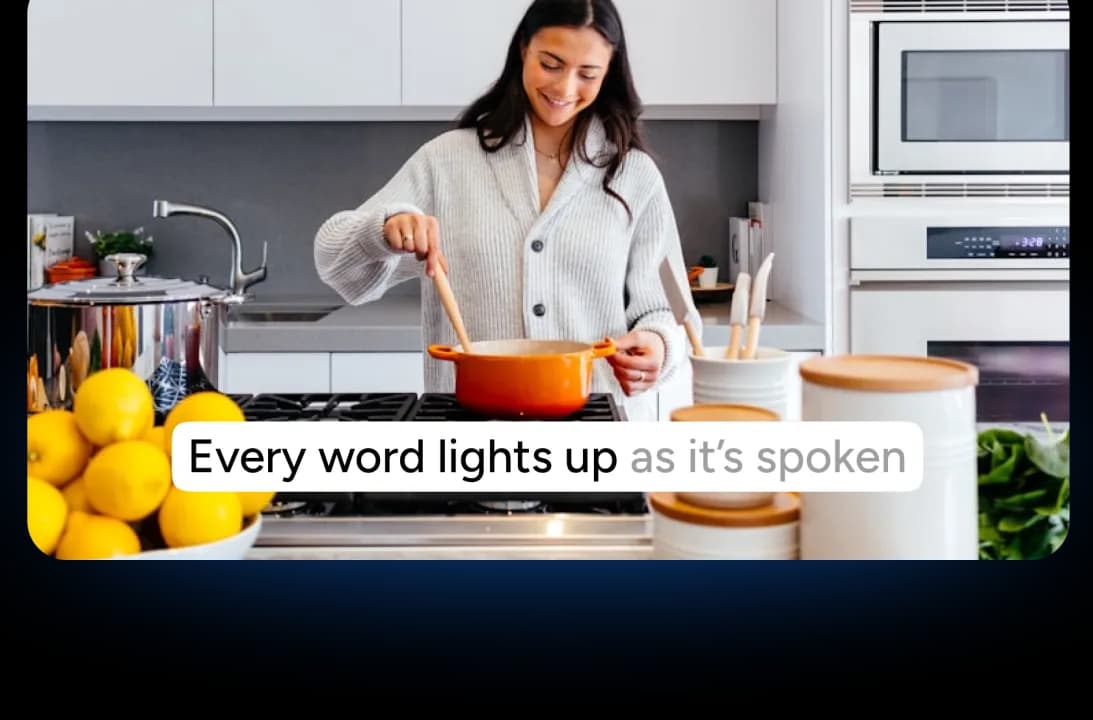
Every word lights up as it's spoken
Each caption starts dim, and every word fades to its full colour at the moment it's said. The timing comes from word-level speech timings, not an even split across the line, so it tracks pauses and fast speech alike. When the last word lands, the next caption takes over.
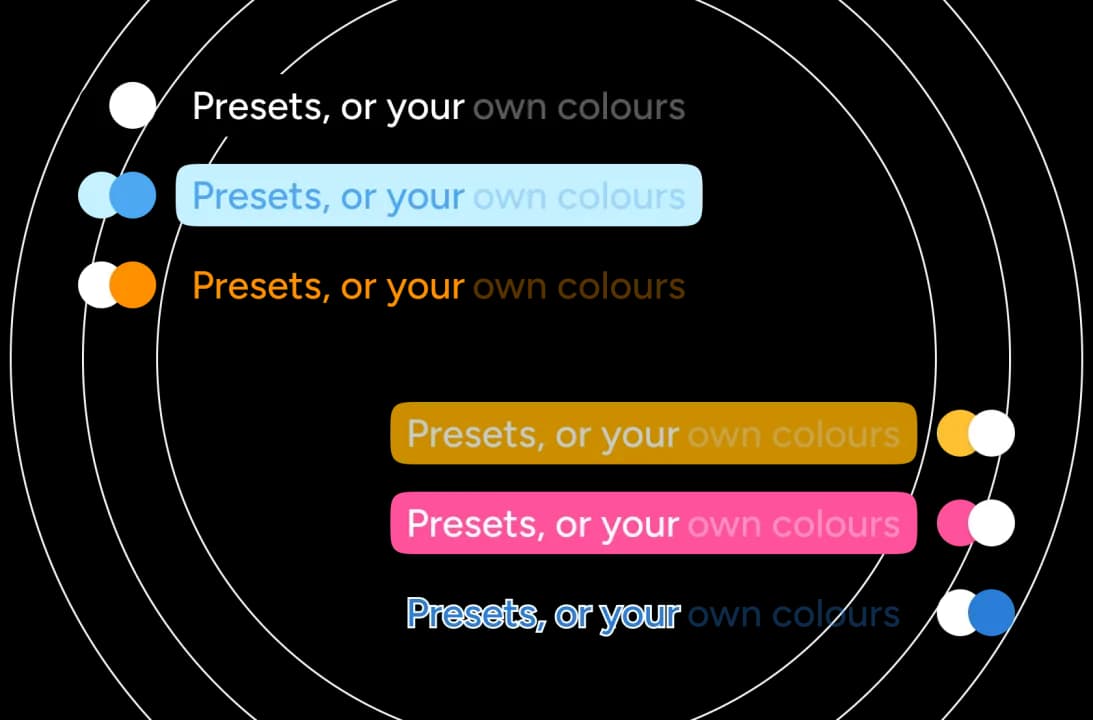
Presets, or your own two colours
Choose captions on a rounded background or outlined straight onto the footage. Both modes ship colour presets, and custom lets you set the text and backdrop yourself. The dim colour is worked out from those two, so there's never a third picker to fiddle with.
Colours that adapt to your footage
On Auto, the brightness behind the caption is measured for every caption and the colours are chosen to suit it. A clip that cuts from a bright room to a dark one gets readable captions in both, without you touching a setting.

Free, with nothing held back
No watermark on the export, no account, no email, and no card. The captioned MP4 you download is the finished file, not a preview you have to pay to unlock.
The details that make captions readable
Line length, timing, contrast, and placement all affect whether a viewer can read your captions. Most tools leave them to chance.
A faithful transcript
There's no language model rewriting your words. Captions are what the speaker said, so nothing gets paraphrased, tidied up, or invented.
The language is detected for you
Speech is recognised across ten languages: English, Spanish, French, German, Italian, Brazilian Portuguese, Hindi, Japanese, Mandarin Chinese, and Arabic. There's no dropdown to get wrong.
Lines sized for reading at a glance
Captions wrap to a column about 25 characters wide on vertical video and 37 on widescreen, measured from the real width of each letter rather than counted, so a line never runs past what you can take in.
Timing that respects reading speed
Captions are held toward a 0.9-second floor so they don't flash past, and the gap between two of them is either closed outright or left long enough to read as deliberate.
An outline that keeps text legible
With the background off, captions carry an outline against the footage, so even when the shot is busy or the brightness guess is imperfect, the text stays readable instead of disappearing.
Placed clear of the frame edge
Captions sit inside the caption safe area at the bottom of the frame, clear of descenders being clipped and of the lower-third graphics many clips already carry.
The limits, published up front
Most caption tools don't tell you what they'll accept until your upload fails. Ours are below.
10
Languages, detected automatically
500 MB
Max upload, up to 10 minutes
0
Watermarks
Free
No sign-up needed
How it compares
Every tool here calls itself free. The difference is what the free export gives you. Checked against each vendor's own pricing page in July 2026.
| Features |  | VEED | Kapwing | Submagic |
|---|---|---|---|---|
| No watermark on free exports | Never | Watermarked | Watermarked | Watermarked |
| No sign-up or account | Not needed | Required | Required | Required |
| Word-by-word animated captions | Included | Included | Included | Included |
| Edit captions before export | Not yet | Full editor | Full editor | Text editor |
Other video tools worth a look
All free, all in the browser, none of them asking you to sign up.

Translate Video with AI
Transcribe, translate & AI-dub MP4, MOV & WebM videos into 82 languages. Free, no watermark.

Create Quiz from Video
Turn any video into an interactive quiz automatically. Perfect for lectures, webinars, and training recordings.

Summarize MP4 Videos
Upload an MP4 and get an AI summary in seconds. Free, browser-based, no signup.
MP4 Video Compressor
Compress MP4 videos online for free. Reduce video file size by up to 90% without losing quality.
Convert PowerPoint to Video with AI
Convert PowerPoint presentations to videos with AI narration.
AI Audio Narration Generator
Generate professional AI audio narration in MP3 format for your PowerPoint presentations. Create voiceovers that can be easily added to slides.
Keep going with these tools
The tools people reach for next, plus the SlideSpeak features behind them.
AI Audio Narration Generator
Generate professional AI audio narration in MP3 format for your PowerPoint presentations. Create voiceovers that can be easily added to slides.
Text to PPT
Turn any text or prompt into an editable PowerPoint deck in seconds.
AI Presentation Generator
Create a full slide deck from a prompt, topic or document.
Frequently Asked Questions
Everything you need to know about adding captions to your videos.

Turn any idea into a presentation — free to try
An AI presentation platform to turn ideas, PDFs, Word, and Excel files into ready-to-present slides.